


Monthly Archives: May 2026
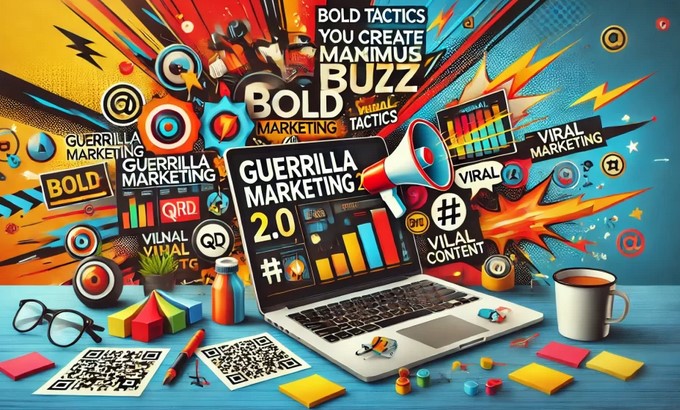
Guerrilla Marketing Tactics That Make a Bold Impact
Source:https://businessmind.ink
I’ll never forget standing on a street corner in Manhattan back in 2014, watching a crowd gather around what looked like a massive, spilled bucket of bright blue paint. People weren’t annoyed; they were taking selfies. As I leaned in closer, I saw a tiny, discreet logo for a local flooring company tucked into the “mess.”
That company didn’t have a Super Bowl budget. They didn’t even have a billboard budget. But for the price of three gallons of paint and a permit, they owned that sidewalk for forty-eight hours.
In my ten years of navigating the business trenches, I’ve learned one hard truth: Money isn’t the loudest thing in the room—creativity is. If you’re a small business owner or a marketing manager feeling like you’re shouting into a void filled with corporate giants, it’s time to stop playing by their rules. It’s time to talk about guerrilla marketing tactics.
What is Guerrilla Marketing, Really?
Think of traditional marketing like a heavyweight boxing match. You need size, reach, and a massive amount of stamina (capital) to stay in the ring. Guerrilla marketing tactics, on the other hand, are more like Parkour. It’s about using the existing environment in ways no one else thought of to get from Point A to Point B with maximum speed and style.
The term, coined by Jay Conrad Levinson, refers to unconventional, low-cost strategies that rely on time, energy, and imagination rather than a huge marketing budget. To the uninitiated, it looks like a prank. To a seasoned business strategist, it’s a high-ROI (Return on Investment) surgical strike.
Why “Going Viral” Isn’t the Only Goal
Many beginners make the mistake of thinking a guerrilla campaign is only successful if it trends on X (formerly Twitter) or TikTok. While virality is a nice “side effect,” the real goal of these guerrilla marketing tactics is unfiltered engagement.
In an era where we see up to 10,000 ads per day, our brains have developed a “blindness” to digital banners. Guerrilla marketing pierces that veil because it meets people where they live, breathe, and drink coffee, often catching them in a state of “positive surprise.”
High-Impact Guerrilla Marketing Tactics for Your Playbook
1. Ambient Marketing: The Art of Integration
Ambient marketing involves placing ads in unusual places or on unconventional items where you wouldn’t normally expect to see them.
-
The Tactic: Use the everyday environment—park benches, elevators, manhole covers—and transform them into part of your brand story.
-
The Experience: I once consulted for a watch brand that wrapped “watch-style” handles around the hand straps in airport shuttle buses. Passengers literally “tried on” the watch while standing.
-
Why it Works: It bridges the gap between digital “noise” and physical reality.
2. Undercover (Stealth) Marketing
This is the “Secret Agent” of guerrilla marketing tactics. It involves marketing to people without them realizing they are being marketed to.
-
The Tactic: Paying “actors” or brand ambassadors to use a product in a public space and talk about it naturally.
-
The Professional Insight: This is a double-edged sword. If you’re too “salesy,” you look like a fraud. The key is authenticity. If you have a new beverage, don’t have people hand out flyers. Have them sit in a trendy park, drinking it, and looking like they’re having the time of their lives.
3. Flash Mobs and Experiential Pop-ups
While the “dance-off” flash mob is a bit dated, the core concept of a sudden, high-energy event still holds massive weight.
-
The Tactic: Organize a sudden, synchronized event in a high-traffic area that demonstrates your brand’s personality.
-
The Shift: Modern flash mobs are less about dancing and more about spectacle. Think of Red Bull’s high-altitude stunts or a sudden “silent disco” in a library to promote a noise-canceling headphone brand.
Technical Foundations: The “Guts” of a Campaign
To execute these guerrilla marketing tactics effectively, you need more than just a “cool idea.” You need to understand the underlying mechanics of Consumer Psychology and Hyper-local Targeting.
The Scarcity and Novelty Factor
The human brain is hardwired to notice things that are out of place. This is known as the Von Restorff Effect (or the Isolation Effect). When everything in a street is grey and standard, a single neon-pink bicycle with your logo on it becomes the focal point of the entire block.
Cost-Per-Impression (CPI) Mastery
In digital marketing, you pay for every click. In guerrilla marketing, your CPI drops the longer your installation stays up.
-
Scenario: A $500 street mural that stays for a month and is seen by 50,000 people results in a CPI of $0.01. That is a level of efficiency Facebook Ads can rarely touch.
Pro-Tips for the Aspiring Guerrilla
Tips Pro: The “3-Second Rule”
If a passerby cannot understand what you are trying to say or what your brand is within 3 seconds of seeing your guerrilla stunt, you’ve failed. Clarity should never be sacrificed for “edginess.”
Always check local ordinances. There is a very fine line between “Guerrilla Marketing” and “Vandalism.” Getting sued or arrested might get you headlines, but it rarely builds brand loyalty. Always use “reversible” methods like chalk, stickers (where legal), or removable installations.
How to Measure Success in the “Wild”
You might be wondering, “How do I track a sidewalk drawing?” It’s easier than you think. Use these LSI (Latent Semantic Indexing) metrics to track your unconventional efforts:
-
Social Mentions: Monitor hashtags specific to the campaign.
-
QR Code Scans: Use unique QR codes on physical assets to track “bridge-to-digital” conversions.
-
Direct Traffic Spikes: Check your Google Analytics for “Direct” traffic or “Brand Name Search” increases during the hours of the campaign.
-
Foot Traffic: If you’re a brick-and-mortar shop, count the “look-ins” versus “walk-ins.”
The “Bold Impact” Checklist
Before you head out to execute your first campaign, run your idea through this filter:
-
Is it Shareable? Will people feel “cool” or “surprised” enough to post it on their Instagram Stories?
-
Is it Relevant? Does the stunt actually relate to what you sell, or is it just noise?
-
Is it Low-Cost/High-Effort? If it costs $50,000, it’s just traditional advertising with a different name.
-
Is it Memorable? Will they talk about it at dinner tonight?
Conclusion: Start Small, Think Weird
Guerrilla marketing isn’t about having the biggest megaphone; it’s about whispering something so interesting that the whole room stops to listen. In my decade of experience, the campaigns that truly moved the needle weren’t the ones with the most CGI or the highest celebrity endorsements. They were the ones that made a tired commuter smile on their way to work.
You don’t need a permission slip from the “Marketing Gods” to be creative. You just need a deep understanding of your audience and the courage to be a little bit different.
What’s the most creative marketing stunt you’ve ever seen in your city? Did it make you want to buy the product, or just take a picture? Let’s discuss in the comments below!
Mapping the SaaS Marketing Funnel for Growth
Source:https://foundationinc.co
Imagine spending $50,000 on a LinkedIn ad campaign that drives 10,000 visitors to your landing page, only to realize at the end of the month that you’ve closed exactly zero new customers. You didn’t have a traffic problem; you had a “leaky bucket” problem. In the world of Software as a Service, getting someone to click a button is the easy part. Getting them to trust your code enough to hand over their credit card—and keep doing it every month—is where the real battle is won.
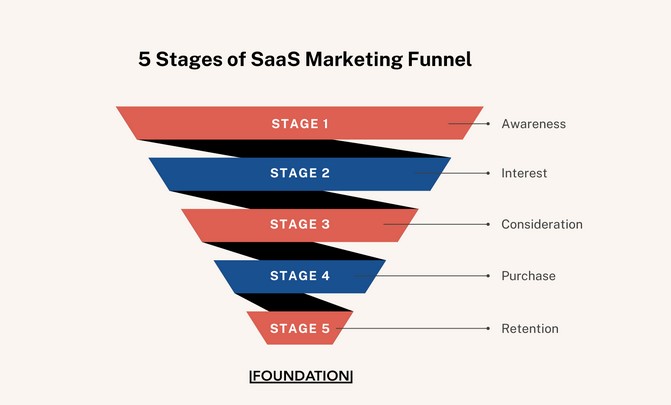
In my decade of scaling B2B software companies, I’ve seen countless founders obsess over the “Top of the Funnel” (TOFU) while their “Bottom of the Funnel” (BOFU) is a ghost town. A successful SaaS marketing funnel isn’t a linear path; it’s an ecosystem. If you treat it like a simple megaphone, you’re going to go broke acquiring users who churn before they even finish their onboarding.
The “Fitness Journey” Analogy: Understanding the SaaS Funnel
Think of the SaaS marketing funnel like a fitness journey.
-
Awareness: This is someone seeing an ad for a new gym (they realize they need to get in shape).
-
Consideration: They read reviews of different gyms and check the equipment list (comparing your features to competitors).
-
Conversion: They sign up for a 7-day trial (the Free Trial or Freemium stage).
-
Retention: They actually show up to work out every day (Product-Led Growth).
-
Expansion: They hire a personal trainer or buy the gym’s protein powder (Upselling).
In SaaS, you don’t just want them to sign up; you want them to get “fit” using your software. If they don’t see results, they’ll cancel their membership by month two.
The TOFU: Driving Awareness and Capturing Demand
The SaaS marketing funnel begins with Awareness. In 2026, the noise is louder than ever. You aren’t just competing with direct rivals; you’re competing with every notification on your prospect’s phone.
Strategic Content and SEO
We don’t just write “blog posts” anymore; we build “authority pillars.” You want to capture users when they are searching for a solution to a problem, not just when they are looking for your specific brand.
-
Problem-Led Growth: Create content around “How to automate X” rather than “Why our software is great.”
-
LSI Keywords: Customer Acquisition Cost (CAC), Lead Magnet, Inbound Marketing, Demand Generation, Marketing Qualified Lead (MQL).
Personal Insight: The “Hidden” Intent
I’ve found that the best TOFU leads often come from “Dark Social”—podcasts, Slack communities, and word-of-mouth that doesn’t show up in your Google Analytics. Don’t be afraid to invest in brand-building that isn’t immediately “clickable.”
The MOFU: Nurturing the Consideration Phase
Once they know you exist, they enter the Middle of the Funnel (MOFU). This is the most dangerous stage because it’s where “leads go to die.”
The Trust Gap
At this stage, the prospect is asking: “Will this actually work for my specific team?” You bridge this gap with:
-
Comparison Pages: Be honest. Compare yourself to the “Big 3” in your niche. If you try to hide your competitors, you look insecure.
-
Webinars and Deep-Dives: Show the product in action. Don’t just show the UI; show the results.
-
Lead Nurturing: Use automated email sequences that provide value (templates, checklists) rather than just “Checking in!” emails.
The BOFU: Closing and Onboarding
The Bottom of the Funnel is where the Conversion happens. In SaaS, this is often the transition from a Free Trial or Freemium model to a Paid Subscriber.
-
The “Aha!” Moment: Your funnel must lead the user to the exact moment they realize the value of the software. For Slack, it was sending 2,000 messages. For Dropbox, it was saving one file. Find your “Aha!” and optimize the funnel to get the user there as fast as possible.
-
Frictionless Checkout: If your “Pro” plan requires a 20-minute sales call but your competitor has a “Buy Now” button, you’re losing 30% of your revenue to friction.
Beyond the Funnel: Retention and Expansion (The Flywheel)
Standard marketing funnels end at the sale. SaaS marketing funnels do not. Because SaaS relies on recurring revenue, the “Post-Purchase” experience is actually the most profitable part of the funnel.
Retention is the New Acquisition
If your Churn Rate is 10% monthly, you have to replace your entire customer base every year just to stay flat.
-
Customer Success: Move from reactive support to proactive success.
-
Expansion Revenue: It is 5x cheaper to sell a new feature to an existing customer than to acquire a new one.
Expert Advice: The “MQL” Trap
Tips Pro: Stop Obsessing Over MQLs.
Years ago, we lived and died by the Marketing Qualified Lead (MQL)—someone who downloaded a whitepaper. In 2026, an MQL is often just a “window shopper.” Instead, focus on Product Qualified Leads (PQLs). A PQL is someone who has actually used your software’s core feature during a trial. PQLs convert to paid users at a 3x to 5x higher rate than MQLs. Shift your marketing budget to drive product usage, not just email signups.
Scannable Metrics: What to Track at Each Stage
| Funnel Stage | Key Metric | Why It Matters |
| TOFU | Unique Visitors / Cost Per Click | Measures your “reach” and brand awareness. |
| MOFU | Lead-to-Trial Conversion % | Measures if your messaging is hitting the mark. |
| BOFU | Trial-to-Paid Conversion % | Measures the “Aha!” moment and product-market fit. |
| Post-Sale | Net Revenue Retention (NRR) | Measures if you are growing within your existing base. |
Technical Accuracy: Calculating Your Funnel Efficiency
To truly map your funnel for growth, you must understand your LTV:CAC Ratio.
-
LTV (Lifetime Value): How much a customer pays you before they cancel.
-
CAC (Customer Acquisition Cost): Total marketing and sales spend divided by new customers.
The Golden Ratio: For a SaaS business to be healthy, your LTV should be at least 3x higher than your CAC. If your ratio is 1:1, you’re a charity, not a business. If it’s 5:1, you aren’t spending enough on marketing.
Conclusion: Build a Funnel That Breathes
Mapping the SaaS marketing funnel is not a “set it and forget it” task. It requires constant tinkering. I’ve seen $100M companies nearly collapse because they stopped looking at their retention metrics, and I’ve seen “garage startups” dominate because they were obsessed with their users’ “Aha!” moment.
Don’t just drive traffic. Build a path that turns strangers into curious trialers, and trialers into lifelong advocates. In the subscription economy, the relationship is the product.
Where is your funnel currently “leaking” the most—is it getting people to sign up for the trial, or getting them to actually pay once the trial ends? Let’s troubleshoot your metrics in the comments!
Licensing Revenue Model: How It Works and When to Use It
Source:https://vitrina.ai
Imagine you’ve spent three years and your entire life savings developing a revolutionary new enzyme that breaks down plastic in oceans. You have the patent, the proof of concept, and a small laboratory. But to actually make a dent in the world, you need massive manufacturing plants, global logistics, and a sales force in fifty countries. You have two choices: spend the next twenty years trying to become a billionaire manufacturer, or sign a piece of paper today that lets a global chemical giant do the heavy lifting while you collect checks in your sleep.
In my decade of consulting for tech startups and IP-heavy firms, I’ve seen the licensing revenue model transform “garage inventions” into global empires almost overnight. It is the ultimate “work smarter, not harder” strategy. However, I’ve also seen founders accidentally “license away the farm” because they didn’t understand the technical guardrails of the agreement.
Licensing isn’t just about selling a brand; it’s about monetizing Intellectual Property (IP) without the headache of daily operations. Let’s dive deep into how this engine actually purrs.
The “Rent-a-Brain” Analogy: Understanding the Core Concept
Think of the licensing revenue model like real estate for ideas.
-
The Licensor (You): You are the landlord who owns a prime piece of property (your patent, trademark, or software).
-
The Licensee (Partner): They are the tenant who wants to use that property to run their business.
-
The License Agreement: This is the lease. It dictates how long they can stay, what they can do on the property, and exactly how much “rent” they owe you.
The tenant pays you for the right to occupy the space, but you still own the land. If they stop paying or trash the place, you can evict them and rent it to someone else. You get the income without having to run the grocery store that sits on your land.
How the Licensing Revenue Model Works: The Technical Mechanics
A successful licensing deal isn’t a handshake; it’s a high-precision legal and financial structure. When we build these models for clients, we focus on four critical components:
1. The Scope of Rights
This defines exactly what is being licensed. Is it the entire patent portfolio or just a specific use case? For instance, I once worked with a software firm that licensed its AI to a medical company for “diagnostic use” only. This allowed them to later license the exact same code to a gaming company for “character physics,” effectively doubling their revenue from the same asset.
2. The Payment Structure (Royalties and Fees)
This is the heart of the licensing revenue model. Usually, it’s a mix of:
-
Upfront Fees: A lump sum paid when the contract is signed. This covers your R&D costs and shows the licensee is serious.
-
Running Royalties: A percentage of gross or net sales (typically 2% to 15% depending on the industry).
-
Minimum Guarantees (MGs): A “floor” payment. If the licensee sells zero products, they still owe you a minimum amount. This prevents them from “sitting” on your tech just to keep it away from competitors.
3. Exclusivity and Territory
You can grant Exclusive rights (only one person can use it) or Non-Exclusive rights (you can sell it to everyone). You can also segment by geography—licensing a brand to one partner in North America and another in Southeast Asia.
-
LSI Keywords: Intellectual Property (IP) rights, royalty rates, sublicensing, trademark licensing, patent monetization, contractual obligations.
When to Use the Licensing Model: Strategic Indicators
I often tell founders that licensing is a “scaling” tool, not necessarily a “startup” tool. You should consider this model when:
-
Market Entry is Expensive: If you have a toy design but no factory in China, licensing to Mattel or Hasbro is faster and cheaper than building your own supply chain.
-
Complementary Assets are Needed: Your technology needs someone else’s platform to work (e.g., licensing a specialized plugin for the Shopify ecosystem).
-
Brand Extension: You have a famous restaurant (brand) and want to put your sauces in grocery stores without becoming a food processing company.
Expert Advice: The “Audit” Warning
Tips Pro: Trust, but Verify with an Audit Clause.
Here is a “hidden warning” from years of experience: Licensees will almost always under-report sales, even if accidentally. > In every licensing agreement I draft, I insist on an Audit Clause. This gives you the right to hire a third-party accountant to inspect the licensee’s books once a year. I’ve seen cases where a simple audit uncovered $500,000 in “unintentional” accounting errors in favor of the licensor. If the discrepancy is more than 5%, the licensee should pay for the cost of the audit.
Scannable Comparison: Licensing vs. Direct Sales
| Feature | Direct Sales Model | Licensing Revenue Model |
| Upfront Cost | Very High (Manufacturing, HR, Ops) | Low (Legal and IP protection only) |
| Control | Total Control over brand/quality | Limited (Relies on partner quality) |
| Profit Margin | Lower per unit (due to overhead) | Extremely High (mostly pure profit) |
| Risk | You lose money if sales fail | Licensee loses money; you keep the IP |
| Scalability | Linear (Grows as you build) | Exponential (Glows as they build) |
The Risks: What Could Go Wrong?
While it sounds like “free money,” the licensing revenue model has teeth. The biggest risk is Brand Dilution. If you license your high-end fashion name to a low-quality shoe manufacturer, your brand’s reputation will suffer.
Another risk is The “Competitor” Trap. Sometimes, a licensee uses your technology to learn your secrets, then develops a “workaround” that doesn’t violate your patent once the contract ends. This is why “Improvements” clauses—stating that any upgrades they make to your tech belong to you—are vital.
Technical Accuracy: Calculating the “Right” Royalty Rate
How do you know what to charge? In the business world, we use the “25% Rule” as a baseline.
-
Estimate the operating profit the licensee will make from your IP.
-
Demand 25% of that profit as your royalty.
-
Convert that into a percentage of Gross Sales for easier accounting.
For example, if a product sells for $100 and yields a $20 profit, your 25% share of profit is $5. Therefore, your royalty rate is 5% of Gross Sales.
Conclusion: Turning Ideas into Assets
The licensing revenue model is the bridge between a brilliant idea and a global market. It allows you to stay in your “Zone of Genius”—innovation and creation—while partnering with those whose “Zone of Genius” is manufacturing and distribution.
In my experience, the most successful licensors are those who treat their licensees as partners, not just “paychecks.” When both sides win, the revenue flows for decades.
Do you have a product or an idea that is currently collecting dust because the cost of manufacturing is too high, or are you worried that licensing might mean losing control over your vision? Let’s tackle those hurdles in the comments!
Career Development Planning for Employee Growth

Source:https://www.culturemonkey.io
A high-performing manager once sat across from me during an exit interview, handing over her badge with a look of quiet resignation. She wasn’t leaving for more money or a fancy title; she was leaving because, in her own words, she felt like she was “running on a treadmill in a dark room.” She was moving fast, but she had no idea where she was going, and neither did we.
In my twelve years of navigating corporate strategy and human capital, I’ve seen this scene play out in startups and Fortune 500 companies alike. We often mistake “busy-ness” for growth. The reality is that 94% of employees say they would stay at a company longer if it simply invested in their learning and development.
Career development planning is not a luxury or a “nice-to-have” HR initiative; it is the fundamental bridge between an employee’s current utility and their future potential. If you don’t build that bridge, your best talent will find someone else who will.
The “GPS” Analogy: Why Planning is Non-Negotiable
Think of an employee’s career like a cross-country road trip.
-
The Car is their current skill set.
-
The Fuel is their motivation.
-
The GPS is the career development plan.
Without a GPS, you can have the fastest car and a full tank of gas, but you’ll likely end up idling in a cornfield or driving in circles. A solid plan doesn’t just show the destination; it identifies the road hazards, the rest stops (milestones), and the necessary upgrades needed for the vehicle to survive the terrain ahead.
As a leader or a professional, if you aren’t looking at the map together, you aren’t traveling—you’re just wandering.
The Core Pillars of Career Development Planning
Effective planning isn’t about promising a promotion in six months. It’s about a structured evolution. In my experience, the most successful plans are built on three technical pillars.
1. The Skill Gap Analysis (Self-Assessment)
Before looking forward, you must look inward. I’ve seen many “ambitious” plans fail because they weren’t grounded in reality. This stage involves identifying the delta between an employee’s current KSA (Knowledge, Skills, and Abilities) and those required for their desired role.
-
Hard Skills: Technical proficiencies (e.g., data analysis, coding, financial modeling).
-
Soft Skills: Emotional intelligence, conflict resolution, and leadership presence.
-
LSI Keywords: Professional growth, individual development plan (IDP), succession planning, talent retention, upskilling.
2. The 70-20-10 Learning Model
This is an industry insight that many “Internet experts” overlook: people don’t grow solely by reading books. A world-class career development planning strategy follows the 70-20-10 rule:
-
70% Experiential Learning: Tough assignments, stretch projects, and “on-the-job” challenges.
-
20% Social Learning: Mentorship, coaching, and peer feedback.
-
10% Formal Education: Workshops, certifications, and traditional courses.
3. Clear, Quantifiable Milestones
A plan without dates is just a wish. I always insist on using SMART goals (Specific, Measurable, Achievable, Relevant, Time-bound). Instead of “becoming a better leader,” the plan should say: “Lead the Q3 product launch team and receive a 4/5 feedback rating on cross-functional collaboration.”
Expert Advice: The “Hidden Warning” of Passive Planning
Tips Pro: The Manager’s Trap.
Many leaders treat career planning as a once-a-year “check the box” exercise during performance reviews. This is a fatal mistake. Career development is a continuous conversation, not an annual event. If the only time you talk about an employee’s future is when you’re discussing their past (reviews), you’ve already lost the emotional connection. Aim for “Growth Check-ins” at least once a quarter, separate from performance discussions.
Scannable Checklist: How to Build a Growth Roadmap
| Phase | Action Item | Key Question |
| Discovery | Audit current strengths and weaknesses. | “What do I love doing vs. what am I good at?” |
| Goal Setting | Define the 1-year and 3-year vision. | “Where do I want to be sitting in 36 months?” |
| Strategy | Apply the 70-20-10 learning model. | “What stretch project will teach me this?” |
| Execution | Secure resources (budget for courses, time for mentorship). | “Does the company support this timeline?” |
| Review | Quarterly feedback loops. | “Are we still on the right road?” |
Technical Accuracy: Linking Growth to Business ROI
To move from a beginner to an intermediate understanding of this niche, you must understand Succession Planning.
A business is only as resilient as its “bench strength.” By investing in career development, you are essentially “future-proofing” the organization. When a senior leader leaves, you shouldn’t have to spend $50k on a headhunter; you should have a “High-Potential” (HiPo) employee who has been following a development plan for two years, ready to step in with minimal friction.
This isn’t just “being nice” to employees; it’s Risk Management.
The Personal Touch: Why It Matters
I remember a young associate I worked with who was technically brilliant but struggled with public speaking. His plan wasn’t just about “taking a class.” We gave him the “70%”—we had him lead small 10-minute segments of our weekly internal meetings.
We gave him the “20%”—I sat with him after every meeting to dissect what worked and what didn’t. Within a year, he was presenting to the Board of Directors. That didn’t happen by accident; it happened by design. When people feel seen for who they can become, their loyalty to the mission becomes unshakable.
Conclusion: The ROI of Human Potential
Investing in career development planning is the highest-yield investment a business can make. It transforms a workforce from a group of “renters” into a team of “owners.” When an employee sees a clear path forward, they stop looking for the nearest exit and start looking for ways to build the house.
Don’t wait for your best people to hand you their badges before you ask them where they want to go. Start drawing the map today.
In your organization, is career growth treated as a shared journey between manager and employee, or is it a “DIY” project left entirely to the individual? Let’s discuss the best way to bridge that gap in the comments below.
Measuring Customer Satisfaction Metrics Effectively

Source:https://francoiselamotte.com
A few years ago, I sat in a boardroom with a CEO who was beaming with pride. “Our sales are up 15% this quarter,” he announced. Yet, looking at the backend data, I saw a terrifying trend: our churn rate had quietly doubled, and the cost to acquire a new customer was skyrocketing. We were pouring water into a leaky bucket, celebrating the flow while ignoring the holes.
In my ten years of navigating the turbulent waters of business operations, I’ve learned that revenue is a lagging indicator—it tells you what happened. If you want to know what will happen, you have to look at your customer satisfaction metrics. According to a recent study, a staggering 80% of companies believe they deliver a “superior experience,” but only 8% of their customers agree. That gap is where businesses go to die.
In this deep-dive, I’m going to pull back the curtain on how to measure these metrics without getting lost in “vanity data.”
The “Health Checkup” Analogy: Why Metrics Matter
Think of your business like a high-performance athlete.
-
Revenue is the gold medal (the result).
-
Customer Satisfaction Metrics are the vital signs—the heart rate, blood pressure, and oxygen levels.
If an athlete’s heart rate is erratic, it doesn’t matter how fast they ran yesterday; they are about to collapse. Similarly, if your metrics show frustration, your “gold medal” quarters are numbered. You don’t measure these things just to have a pretty dashboard; you measure them to predict the future.
The Core Pillars of Customer Satisfaction Metrics
To get a 360-degree view of your customer’s mindset, you need to master the “Big Three.” Each serves a different purpose, and using one without the others is like trying to navigate with only one-third of a map.
1. Net Promoter Score (NPS): The Loyalty Gauge
The NPS is the most famous metric in the business world. It asks one simple question: “How likely are you to recommend us to a friend or colleague?”
-
Promoters (9-10): Your brand ambassadors.
-
Passives (7-8): Satisfied but unenthusiastic; they’ll leave for a 10% discount from a competitor.
-
Detractors (0-6): Customers who are actively looking for an exit and might damage your reputation.
Personal Insight: I’ve found that the “why” behind the score is 10x more valuable than the number itself. Always include an open-ended follow-up comment box. Some of our best product features came from “Passives” telling us exactly what would turn them into “Promoters.”
2. Customer Satisfaction Score (CSAT): The Transactional Pulse
While NPS measures long-term loyalty, CSAT measures short-term happiness. It’s usually a 1-5 scale sent right after a specific interaction—like a support ticket or a purchase.
-
Best used for: Identifying specific friction points in your customer journey.
-
LSI Keywords: Customer touchpoints, Voice of the Customer (VoC), Sentiment analysis, Qualitative data.
3. Customer Effort Score (CES): The Friction Finder
This is my personal favorite and, in my opinion, the most underrated metric. It asks: “How easy was it to handle your issue today?”
In a world of “over-delivery,” we often forget that customers don’t necessarily want to be “wowed”—they just want their problems solved quickly and easily. High effort is the #1 driver of disloyalty.
Expert Advice: The “Silent Churn” Warning
Tips Pro: Beware of the “Non-Responders.”
The most dangerous customers aren’t the ones giving you a ‘0’ on an NPS survey; they are the ones who stop opening your emails and ignore your surveys entirely. This is Silent Churn. If your survey response rate is dropping, it’s a red flag that your customer base is disengaging. Don’t just analyze the data you have—analyze the silence of the data you’re missing.
How to Implement Metrics Without “Survey Fatigue”
If you send a 20-minute survey every time someone buys a pack of gum, you are going to irritate your customers into leaving. Effective measurement requires a “surgical” approach.
-
The “Micro-Survey” Strategy: Keep it to 1-2 questions. Use “in-app” or “on-site” triggers instead of long emails.
-
Timing is Everything: Send CSATs within 15 minutes of an interaction. Send NPS surveys every 3-6 months to capture the “vibe” of the relationship.
-
Close the Loop: If a customer leaves a negative score, have a manager reach out within 24 hours. I have seen Detractors turn into Promoters simply because they felt heard.
Scannable Comparison: Which Metric to Use When?
| Metric | Primary Goal | When to Send | Key Question |
| NPS | Long-term Loyalty | Every 3-6 months | Would you recommend us? |
| CSAT | Interaction Quality | Post-purchase/Support | How satisfied are you? |
| CES | Ease of Use | After a problem is solved | How easy was this? |
Technical Accuracy: Calculating Your Success
To move from a beginner to an intermediate level, you must understand the math behind the numbers.
-
NPS Calculation: % of Promoters – % of Detractors = NPS. (A score above 50 is excellent; above 70 is world-class).
-
CSAT Calculation: (Total 4 & 5 responses / Total Responses) x 100 = % Satisfied.
-
Churn Correlation: Always map your satisfaction scores against your actual churn. If your NPS is high but people are still leaving, your survey might be biased or targeting the wrong segment.
Conclusion: The Data is a Conversation
Measuring customer satisfaction metrics isn’t about filling up a spreadsheet; it’s about listening to the heartbeat of your company. In my experience, the businesses that survive the longest aren’t the ones with the flashiest marketing—they are the ones that are obsessed with making the customer’s life easier, one interaction at a time.
Numbers give you the “what,” but your empathy gives you the “why.” Use both, and you’ll find that the revenue takes care of itself.
Does your team currently prioritize long-term loyalty (NPS) or the ease of the transaction (CES), and have you noticed a direct link between those scores and your bottom line? Let’s talk strategy in the comments!
Remote Tech Stack Essentials for Distributed Teams
 It is 2:00 AM in Tokyo, 10:00 AM in Dubai, and 7:00 AM in London. A critical bug just bypassed the staging environment and hit production. Five years ago, this would have triggered a chaotic chain of frantic phone calls and missed emails. Today, the “war room” is a digital space that springs to life automatically, with automated logs flowing into a specific channel and team members collaborating in real-time without saying a single word out loud.
In my decade of building and scaling distributed organizations, I’ve learned that a remote team is only as strong as the “digital glue” that holds it together. Many leaders make the mistake of thinking that a Zoom subscription and a Slack channel constitute a strategy. They don’t. That is merely survival. A true remote tech stack essentials strategy is about creating a frictionless environment where the technology disappears, leaving only the work.
The “Digital Office” Analogy: Why Your Stack Matters
Think of your remote tech stack like a physical office building.
-
The Foundation: Your security and identity management (who is allowed in).
-
The Hallways: Your communication tools (how information moves).
-
The Desks: Your project management tools (where the actual work sits).
-
The Filing Cabinets: Your knowledge management (how you remember what you did).
If you have great desks but no hallways, your team will work in silos. If you have great hallways but no foundation, your company’s data is walking out the front door. To build a high-performing distributed team, you need a balance of all four.
The Communication Layer: Synchronous vs. Asynchronous
The biggest killer of remote productivity is “Zoom Fatigue.” According to recent workplace studies, the average remote worker spends 25% more time in meetings than they did in an office. This is a failure of the tech stack.
Synchronous Tools (The “Now” Tools)
You need high-fidelity tools for real-time problem-solving. Slack or Microsoft Teams are the industry standards, but in 2026, we are seeing a shift toward “Virtual Huddle” tools like Gather or Tandem, which mimic the serendipity of tapping a colleague on the shoulder.
Asynchronous Tools (The “Later” Tools)
This is where the magic happens. I always tell my clients: “If it doesn’t need to be a meeting, make it a Loom.”
-
Loom: Using video messaging allows you to convey tone and nuance without forcing everyone into a 30-minute calendar block.
-
Threads: A newer breed of communication tool designed specifically to kill the “Slack spiral” by organizing discussions into readable, searchable threads.
Project Management: Moving Beyond the To-Do List
A distributed team cannot rely on “status update” meetings. The tech stack must provide a Single Source of Truth (SSOT).
The Heavy Hitters: Notion, Monday.com, and ClickUp
In my experience, the “best” tool is the one your team actually uses. However, for distributed teams, Notion has become a powerhouse because it blends project management with documentation.
-
Kanban Boards: Visualizing the workflow helps everyone see where bottlenecks are occurring.
-
Automated Workflows: Using tools like Zapier or Make to connect your project management to your communication tools. For example, when a task is marked “Complete” in ClickUp, a notification automatically goes to the client’s Slack channel.
-
LSI Keywords: Asynchronous communication, SaaS integration, Workflow automation, Single Source of Truth (SSOT), Digital transformation.
The Knowledge Vault: Documentation as a Superpower
In an office, you can ask a colleague, “How do we file expenses?” in the breakroom. In a distributed team, if that answer isn’t documented, it doesn’t exist.
Guru and Scribe are essential additions to your remote tech stack essentials.
-
Guru acts as a “Wiki” that lives inside your browser, pulling up company policies while you work.
-
Scribe automatically turns your mouse clicks into step-by-step PDF guides.
Personal Insight: I’ve seen teams double their onboarding speed simply by moving from “explaining things over Zoom” to “linking to a Scribe guide.” Documentation is the only way to scale a distributed team without the founder becoming a human FAQ machine.
Security and Infrastructure: The Invisible Shield
You cannot ignore the “Foundation.” Distributed teams are prime targets for phishing and data breaches because every home Wi-Fi is a potential entry point.
-
Identity Management (Okta/JumpCloud): One login to rule them all. If an employee leaves, you can revoke access to 50+ apps with one click.
-
Password Management (1Password/LastPass): Never, ever share passwords in Slack. It is the digital equivalent of leaving your house keys under the doormat.
-
Hardware Security: In 2026, Endpoint Detection and Response (EDR) tools are mandatory for teams handling sensitive client data.
Expert Advice: The “Tool Fatigue” Warning
Tips Pro: The “One-In, One-Out” Rule.
Every new tool you add to your stack increases the “Cognitive Load” on your team. They have to remember another password, check another notification bell, and learn another interface. If you add a new tool, try to retire an old one. If your stack exceeds 10 core tools for a small team, you are likely losing more time to “tool-switching” than you are gaining in productivity.
Scannable Checklist: The Ultimate Remote Stack (2026 Edition)
| Category | Recommended Tool | Why It’s Essential |
| Communication | Slack + Loom | Instant chat for speed, video for context. |
| Project Management | Monday.com / Notion | Centralizes tasks and documentation. |
| Security | 1Password + Okta | Protects company data across global IPs. |
| Meeting Tech | Zoom + Otter.ai | Video calls with automated AI transcription. |
| Design/Collab | Figma / Miro | Real-time whiteboarding for brainstorming. |
| Automation | Zapier | The “glue” that connects all other tools. |
Conclusion: Culture is the Final App
Your remote tech stack essentials are the plumbing and the electricity of your business, but they aren’t the soul. You can have the most expensive tools in the world, but if your culture doesn’t value transparency and accountability, the tools will just help you fail faster.
Technology should empower your team to do the best work of their lives from anywhere on the planet. Start with the problem you’re trying to solve, choose the tool that has the lowest friction, and always, always prioritize documentation over meetings.
What is the one tool in your current stack that you absolutely couldn’t live without, or is there a “productivity killer” you’re currently trying to replace? Let’s share some insights in the comments!