


Hybrid Event Solutions for a Seamless Experience
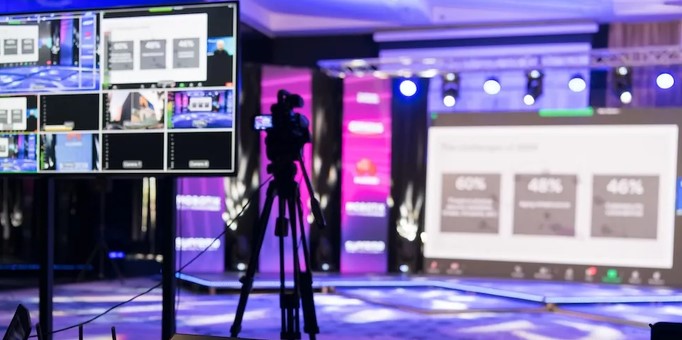
Source:https://loghicconnect.com.au
Imagine this: It’s the morning of your company’s flagship annual conference. The main ballroom is buzzing with energy, the stage lights are perfectly calibrated, and your in-person attendees are sipping coffee, ready for the keynote. But behind the scenes in the control room, panic is setting in. The virtual streaming platform has crashed, the remote speakers can’t connect to the audio mixer, and 1,500 online ticket holders are flooding your customer support inbox demanding refunds.
Over my ten-plus years as a corporate strategist, operations consultant, and business writer, I have stood in that exact, sweat-inducing control room. I have witnessed the transition from purely physical gatherings to completely virtual webinars, and finally, to the complex modern frontier: hybrid events. The hard-learned truth is that pulling off a truly successful dual-audience gathering requires much more than just putting a webcam in the back of a conference room.
Building a bridge between a physical crowd and a digital audience requires robust, carefully planned hybrid event solutions. Let’s look at the mechanical infrastructure, technical frameworks, and audience strategies needed to deliver a truly seamless experience for every single attendee.
The Dual-Audience Challenge: Why Traditional Event Planning Fails
Before diving into the technology, we have to address a fundamental psychological roadblock. Many organizers treat a hybrid event as a single event with an added live stream. This is a recipe for disaster.
Think of a poorly executed hybrid event like broadcasting a live theater play on television without moving the cameras. The people in the front row of the theater have an amazing, immersive experience. Meanwhile, the viewers at home are sitting on their couches watching tiny figures move around a distant stage, feeling completely disconnected from the room.
To create a truly seamless experience, you must approach your planning as if you are producing two distinct event experiences tied together by a shared narrative.
Every decision you make must satisfy two fundamentally different sets of technical and engagement needs:
-
The In-Person Audience: Focuses on physical venue logistics, networking spaces, acoustic clarity, and high-quality catering.
-
The Virtual Audience: Focuses on platform user interface (UI), streaming latency, interactive digital tools, and technical tech support access.
Core Technical Pillars: Choosing the Right Hybrid Event Solutions
To bridge the gap between your physical venue and digital interfaces, your foundational technology stack must be rock-solid. Here are the core pillars that experienced event production teams rely on.
1. Unified Event Management Platforms
Do not make the mistake of using one ticketing platform, a separate mobile app for in-person schedules, and a third standalone video player for virtual streams. Your hybrid event solutions should start with a unified software ecosystem (such as vFairs, Hopin, or Bizzabo).
A unified platform creates a single central database for all your registration data, attendee profiles, and analytics. Whether someone is scanning a QR code badge at the physical registration desk or logging in from a browser in Tokyo, they should exist within the exact same system. This allows in-person and remote attendees to view the same directory, swap digital business cards, and message each other directly.
2. High-Performance Broadcast Audio-Visual (AV) Infrastructure
The quickest way to lose your virtual audience is through poor audio quality. If a remote viewer cannot hear a speaker clearly, or if there is a distracting echo from the physical room, they will close their laptop window within two minutes.
-
The Setup: Your physical venue requires a dedicated broadcast audio mixer separate from the house PA system. This allows the audio engineer to adjust volume levels specifically for the web stream without altering the sound inside the physical room.
-
The Camera Strategy: Implement a multi-camera setup with dedicated wide shots of the stage and tight tracking shots of the speaker. This keeps the visual feed dynamic and engaging for remote viewers.
3. Integrated Engagement Tools
To make virtual attendees feel like active participants rather than passive observers, you must build live interaction directly into your presentations. Use cross-platform tools like Slido or Mentimeter to run live polls, Q&A sessions, and gamified trivia.
When a keynote speaker asks a question, both the crowd in the room and the audience at home should cast their votes simultaneously using their smartphones or laptops, with the unified results displayed instantly on the big stage screen.
+------------------------+--------------------------+--------------------------+
| Hybrid Event Component | Physical Venue Focus     | Digital Platform Focus   |
+------------------------+--------------------------+--------------------------+
| Audio Production       | Acoustic Room Tuning     | Independent Web Feed     |
| Networking Infrastructure| Dedicated Lounges        | AI Matchmaking Software  |
| Presentation Flow      | Main Stage Display       | Low-Latency Live Stream  |
| Q&A Interactivity      | Floor Microphones        | Unified Mobile App Q&A   |
+------------------------+--------------------------+--------------------------+
Expert Advice: The Hidden Threat of Venue Bandwidth
The Dedicated Bandwidth Trap
When booking a physical hotel or convention center, sales representatives will often proudly tell you, “We have lightning-fast Wi-Fi throughout the entire property.” Do not take this statement at face value.
Standard venue Wi-Fi is shared among all guests, hotel staff, and nearby rooms. The moment hundreds of your in-person attendees connect their phones to look at the schedule or check email, that shared connection will choke.
Pro Tip: You must explicitly negotiate a Dedicated, Symmetrical Internet Connection (Hardwired Ethernet) solely for your broadcast streaming encoder. Demand a minimum of 20 Mbps to 30 Mbps of upload speed that is completely isolated from the attendee Wi-Fi network. Without this dedicated pipeline, your high-definition video stream will lag, pixelate, or drop completely.
Designing the Schedule: Combating “Zoom Fatigue”
A massive operational mistake intermediate event planners make is forcing virtual attendees to adhere to a rigid, day-long physical schedule. An in-person attendee is happy to sit through a 90-minute panel discussion because they are enjoying the physical environment. A remote viewer sitting in a home office will experience screen fatigue very quickly.
Keep your hybrid sessions concise, ideally limiting main-stage presentations to 20 to 30 minutes.
During physical coffee breaks or networking hours, do not just leave a generic “We will be right back” slide on the virtual screen. Instead, utilize those windows to broadcast exclusive digital content. Run backstage interviews with speakers, host a live studio commentary desk, or set up virtual speed-networking chat rooms powered by AI matchmaking algorithms to keep your online audience engaged.
The Future of Business Gatherings
Embracing modern hybrid event solutions isn’t just an operational safety net—it is a powerful tool for scaling your brand’s reach. By removing geographical boundaries, physical travel costs, and venue capacity limits, you open your business up to a global audience. The magic happens when your physical and digital environments flow together seamlessly, making every participant feel valued, heard, and connected.
What is your biggest fear or roadblock when it comes to organizing or attending a dual-audience event? Are you struggling to find the right software stack, or are you trying to figure out how to keep your remote viewers from tuning out? Drop your thoughts in the comments below, and let’s figure it out together!